In the Projects folder of the Anaconda Toolbox for Anaconda Notebooks, you can add files, not folders. That is why I ran a search of *.* in my data and added all files to the Projects folder as files, without folders. But without the folder structure, I could not work on the project well enough, and I spent the time to find that the Projects run in a docker container where you can reach the folder by aiming at /home and a hash that you can find by checking the grandparent directory of the project in your notebook.
I uploaded a zip file to the Files browser and found how I could unzip that with its full folder structure to the Projects folder in one go. Now that this has worked, I thought to delete the other files, but I do not have the rights to do so, the “Delete” under the “…”-menu is greyed out:
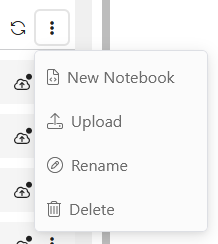
I know that the Projects files are saved in the Anaconda Cloud. That is why I tried to enter the Cloud from my local CLI as you find in Anaconda Cloud Storage | Anaconda.org .
But I run into dependency conflicts, at least with Python 10.13:
ERROR: Cannot install anaconda-cloud-storage==0.1.0, anaconda-cloud-storage==0.1.1, anaconda-cloud-storage==0.3.1, anaconda-cloud-storage==0.3.2 and anaconda-cloud-storage==0.3.3 because these package versions have conflicting dependencies. The conflict is caused by: anaconda-cloud-storage 0.3.3 depends on pydantic anaconda-cloud-storage 0.3.2 depends on pydantic anaconda-cloud-storage 0.3.1 depends on pydantic anaconda-cloud-storage 0.1.1 depends on pydantic anaconda-cloud-storage 0.1.0 depends on pydantic To fix this you could try to: 1. loosen the range of package versions you’ve specified 2. remove package versions to allow pip to attempt to solve the dependency conflict [notice] A new release of pip is available: 25.2 → 25.3 [notice] To update, run: python.exe -m pip install --upgrade pip ERROR: ResolutionImpossible: for help visit Dependency Resolution - pip documentation v26.0.dev0
I already tried to stepwise install some packages around it to avoid the conflicts, but it did not help.
How can I delete the files from Anaconda Toolbox Projects? How can I delete a whole project, since even that cannot be done? I guess I have to enter the cloud and do it there and then synchronize.
From now on, I rather work in the Files browser (the data icon at the top of the anaconda menu) again, it seems too clumsy to handle the cloud storage to work in Projects. To add files, I need to find out the hash of the folder in the Docker container. That does not seem to be the way it should be done. And if I cannot enter the Anaconda Cloud Storage with the CLI, I cannot delete anything. I am going to change to the Anaconda Files browser until I know how to deal with the cloud storage.